Search In EntiHub
The Home page in EntiHub is the entry point for searching entities and their data. Depending on which toggle is active — Entities or Data — the search operates differently.
Enter a search term in the text box. To search for a combination of multiple strings (for example "London" and "PPC"), enter them separated by a comma. EntiHub will search for records matching all of the specified terms.
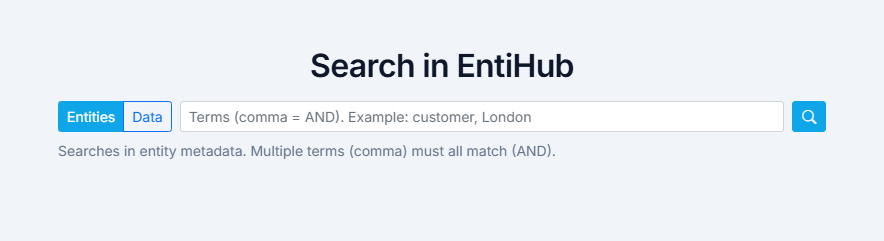
Entity search
When the Entities mode is selected, the search runs against text and descriptive metadata of entities — entity names, domains, column names, descriptions, and similar fields. Results are ranked by relevance. For example, a match found in the entity name ranks higher than a match found in a column description.
Search results are displayed in a list below the search box, showing the matched entity, its description, and where the search term was found.

Data search
When the Data mode is selected, the search runs across all text columns of all entities. After clicking the search button, EntiHub scans the content of every text field across the data.
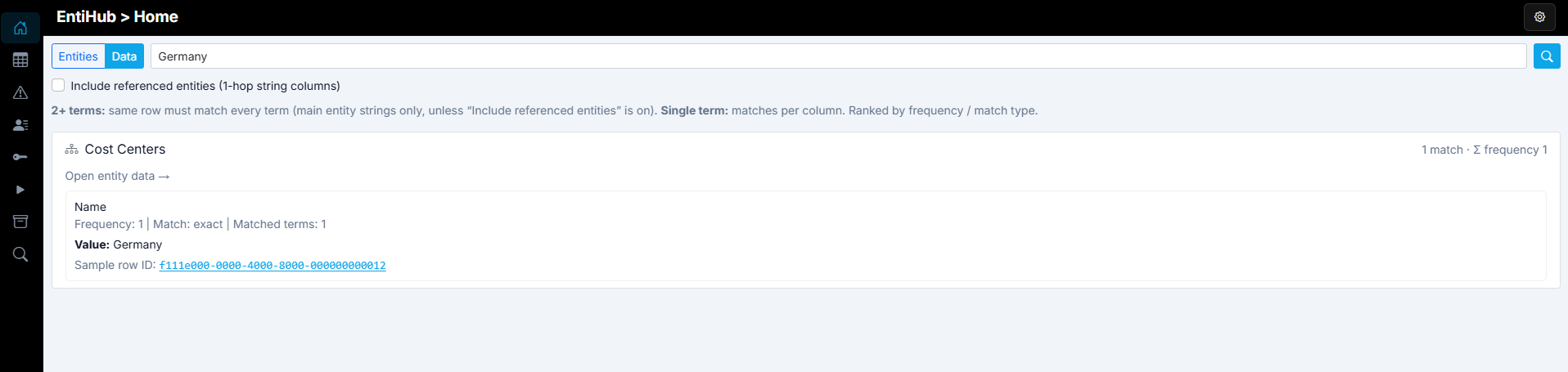
Enabling the Include referenced entities (1-hop string columns) checkbox extends the search to text columns of directly referenced entities. This works one hop deep — only the first level of references is included. If a referenced entity itself references another entity, those values are not searched.
As an example, consider a link entity that defines relationships between two main entities — Country and Product. If the entity is called ProductsInCountries, this search allows you to find records where a specific combination of country and product exists.
After searching, matching records are displayed in a list. Results are aggregated and ranked intelligently by priority:
- Records where multiple search terms are found rank higher.
- An exact match ranks higher than a LIKE or StartsWith match.
The results show the ranked entities and the most relevant records found for the given search terms.
Entity permissions & Search
If a user does not have read access to an entity, they will see a notice that the search term was found in that entity, but no data will be shown. The user must request access from an administrator to view the entity's records.