Setup Entity
Use this guide to create and deploy a new entity safely.
Entity definition in EntiHub is intentionally simple and YAML-first. You can use AI/LLM tools to generate or refine the YAML, then include the output in your CI/CD process.
In this YAML definition, you configure:
- basic metadata (name, domain, description)
- entity behavior (approval flow, history)
- validations (column-level and row-level)
- data model structure (columns, formats, UI behavior)
- anomaly detection (duplicates, drift, graph linkage, and more)
You can export the final definition from the application to Git and deploy it through CI/CD pipelines.
Step-by-step Setup & Deploy
To create a new entity, go to the Entities page and click Add entity in the upper-right corner.
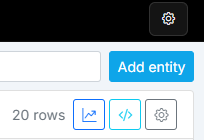
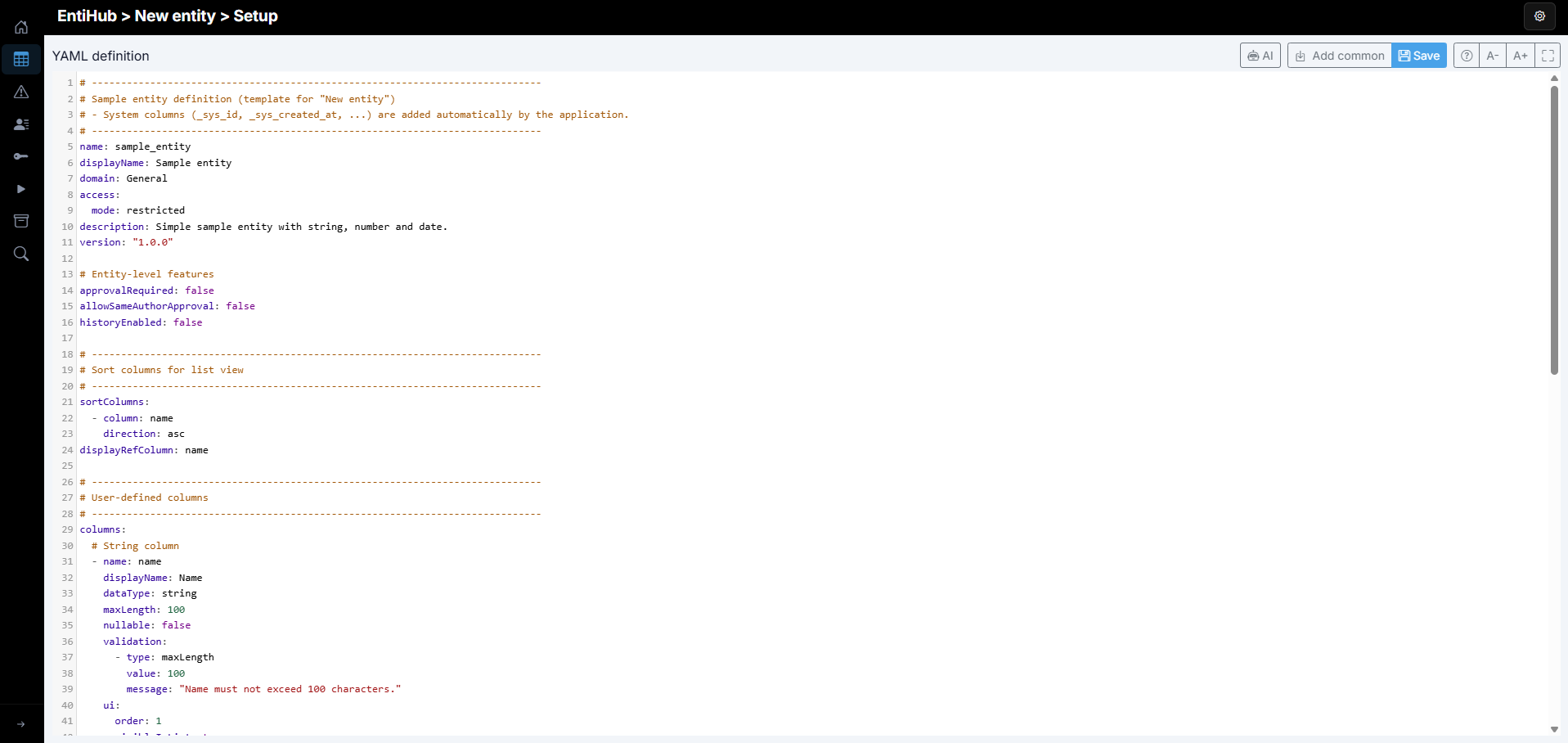
After clicking the button, the YAML editor opens. A starter YAML sample is preloaded and can be adjusted to your requirements.
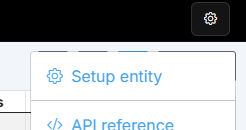
You can also edit existing entities via Setup entity.
The editor supports syntax highlighting and includes action buttons in the upper-right corner for definition and deployment workflows.

The last four buttons provide inline YAML reference documentation, font-size controls, and fullscreen mode.
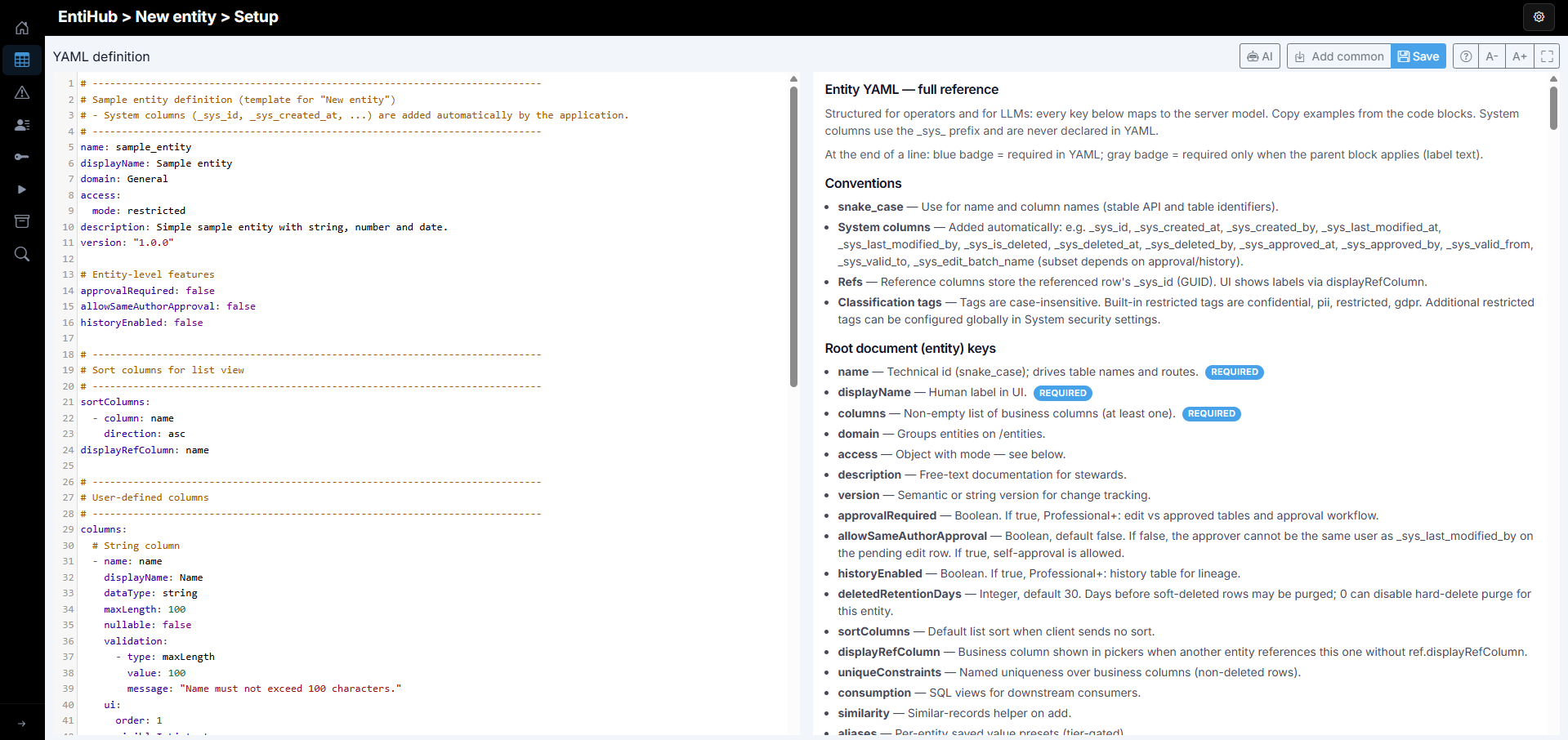
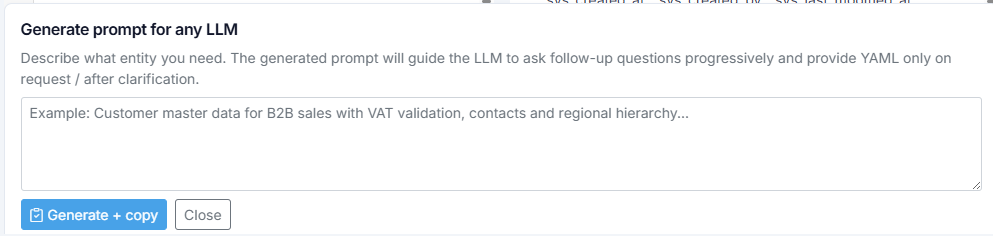
Clicking AI opens a prompt input below the editor where you can describe business requirements for the new entity. After clicking Generate + copy, the app prepares a complete prompt for your AI/LLM chat tool.
The generated prompt includes your requirements and relevant configurable options, limited to features available in your EntiHub tier. It is designed to ask follow-up questions automatically when needed, so complex YAML definitions can be produced quickly from business-level inputs.
With Add common, you can install prebuilt entities with seed data. This feature is documented in Install Common Entities.
Finally, click Save to store the definition in the database. Before saving, the YAML goes through full validation and any issues are shown with detailed error messages.
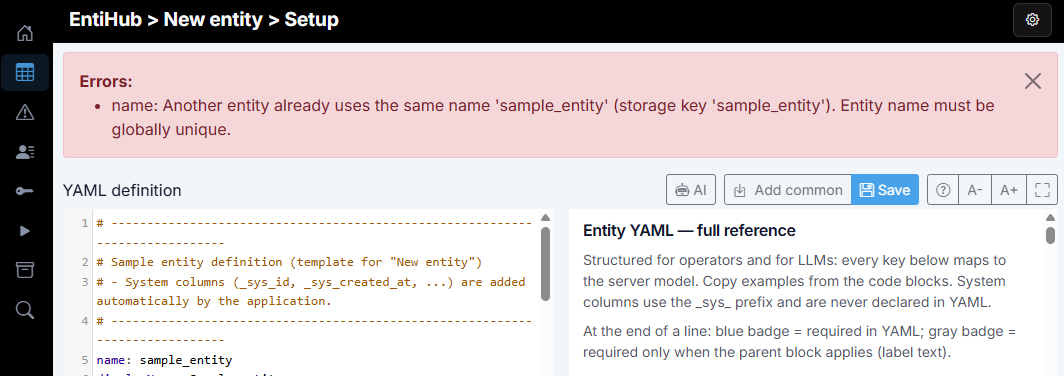
After saving, you can continue with actions such as deployment. In the entity list, non-deployed entities show a gray icon, while deployed entities are shown in green.
When you open setup for an already saved entity, an Actions button appears with additional administrator functions.
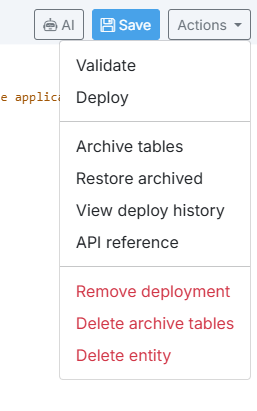
Available actions depend on whether the entity is already deployed. Only currently valid operations are shown. Validate checks the YAML definition.
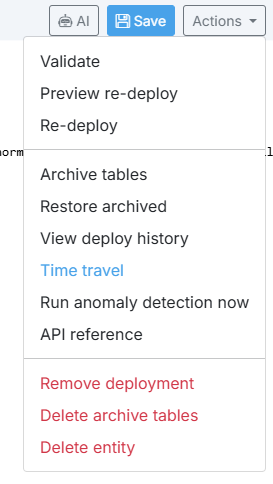
Preview re-deploy shows what schema changes (for example columns) will be applied. For a new entity, Deploy creates physical tables in the database. Depending on Approval and History settings, this can be one to three tables. For an existing entity, use Re-deploy to apply definition changes.
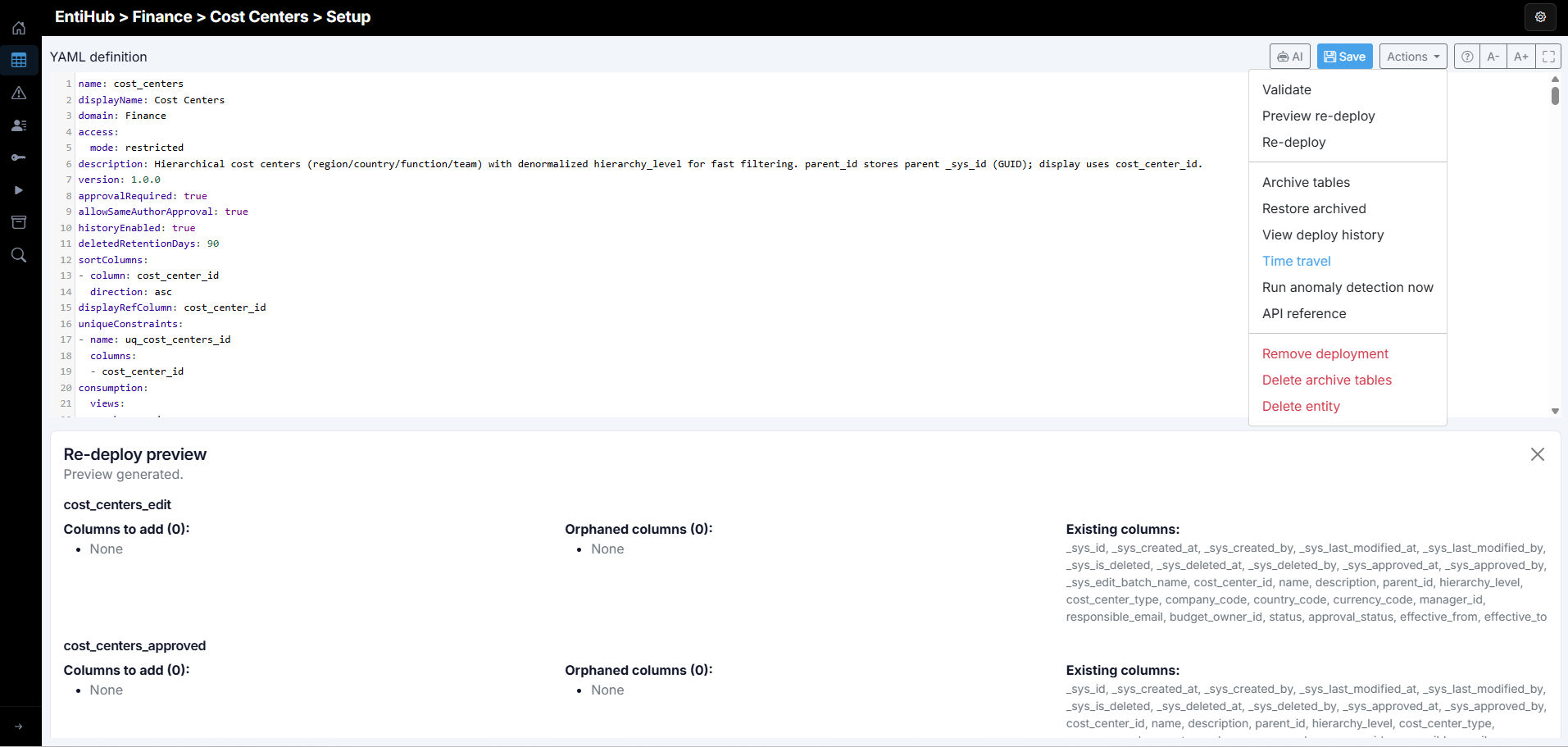
Entity Redeploy
Re-deploy updates existing entity tables. To prevent data loss, this runs in phases: current tables are archived first, new tables are generated from YAML, and then data is copied into the new tables.
If migration fails (for example because of incompatible type changes), new tables can remain empty and manual migration may be required. For additive changes such as new columns, migration is usually automatic.
Archive table naming convention:
{entity-name}-{table-type}-{timestamp-yyyymmdd_hhmmss}
Two additional actions, Archive table and Restore archived, support manual snapshot backup and restore. This is useful when history is disabled or not available in your tier and you need a backup before significant changes.
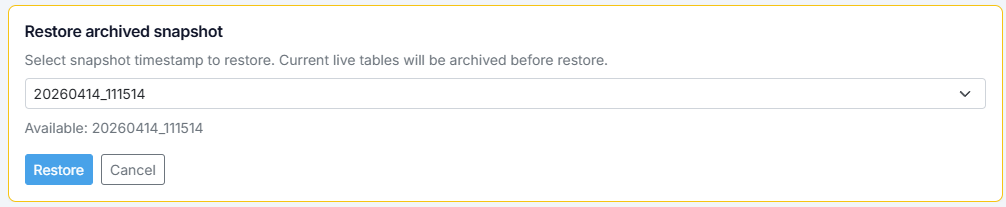
Restore archived entity
Restore does not only recover data. If schema changed after archiving, structure is restored as well. The application first archives the current state with a fresh timestamp, then restores the selected snapshot.
If you are on Enterprise tier and the entity has history enabled, you can perform a time-revert of data to a selected historical timestamp via Time travel.
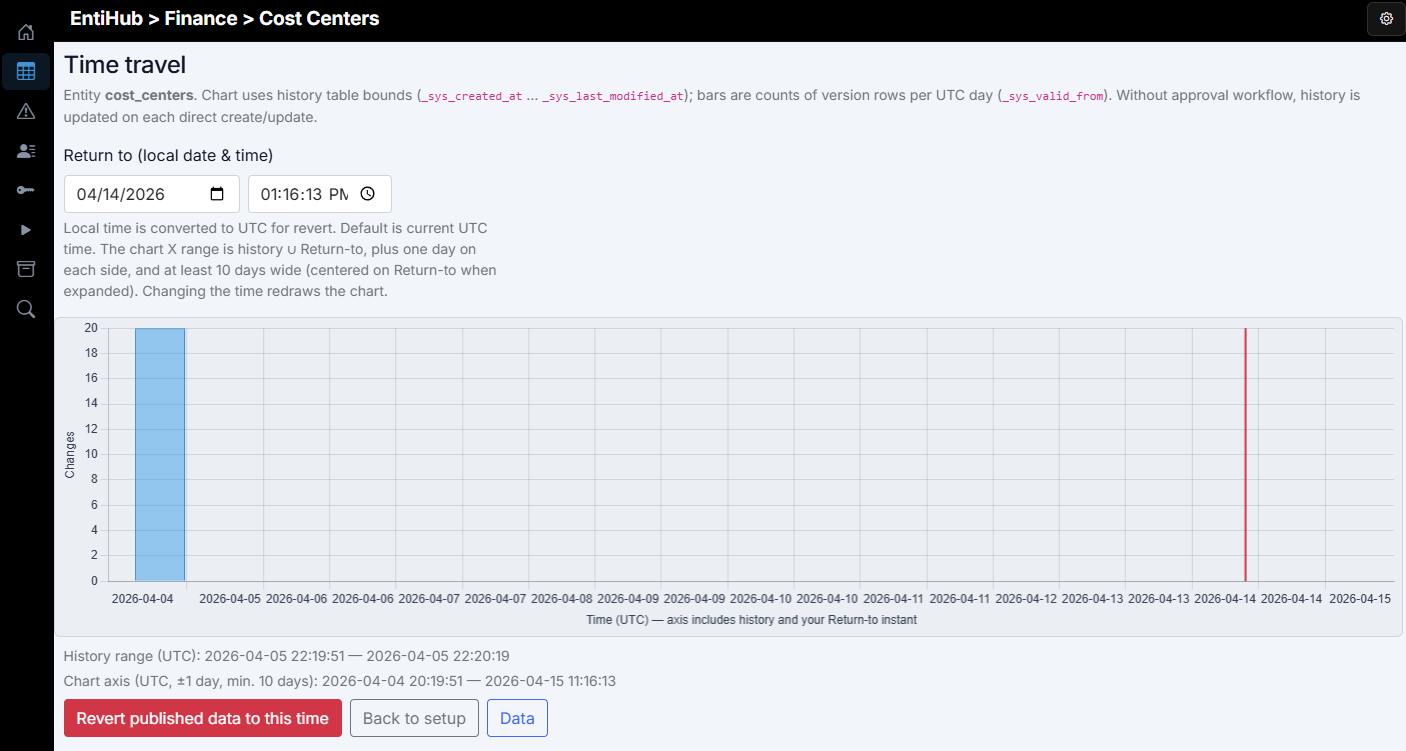
In this window, you see a graph of change counts aggregated by day. Use date/time inputs to select the target point; it is shown as a vertical red line. Clicking Revert published data to this time restores published data to that moment.
Entity time revert
Time revert changes data only; schema is expected to remain unchanged. Current state is recorded in history, then active data is replaced with the state from the selected point in time.
Time revert bypasses approval flow. If approval is enabled, reverted data is applied directly.
Run anomaly detection now triggers anomaly checks immediately, outside the scheduled cron defined in entity YAML.
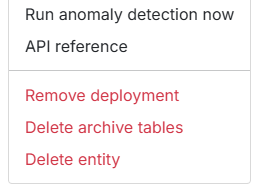
Finally, the action menu also contains cleanup functions: - Remove deployment: removes all entity tables from DB including data. - Delete archive tables: deletes all archived snapshots for the entity. - Delete entity: removes the entity YAML definition from DB.
The next chapter defines individual YAML parameters available in the editor.
Entity YAML Properties
Entity YAML is structured for operators and LLMs. Every key below maps to the server model. System columns use the _sys_ prefix and are never declared in YAML.
Required markers in this guide: - Required in YAML: mandatory field in YAML. - Conditionally required: required only when the parent block applies.
Conventions
# Convention-focused mini sample
name: customer_master
displayName: Customer Master
columns:
    - name: country_id
        dataType: guid
        ref:
            entity: countries
            displayRefColumn: code
    - name: classification_tag
        dataType: string
        defaultValue: internal
snake_case: use fornameandcolumns[].name(stable API and table identifiers).- System columns are added automatically (subset depends on approval and history setup):
_sys_id,_sys_created_at,_sys_created_by,_sys_last_modified_at,_sys_last_modified_by,_sys_is_deleted,_sys_deleted_at,_sys_deleted_by,_sys_approved_at,_sys_approved_by,_sys_valid_from,_sys_valid_to,_sys_edit_batch_name. - Reference (
ref) columns store referenced row_sys_id(GUID). UI label is resolved viadisplayRefColumn. - Classification tags are case-insensitive. Built-in restricted tags are
confidential,pii,restricted. Additional restricted tags can be configured globally in System security settings.
Root Document Keys (Entity)
# Root document example
name: customer_master
displayName: Customer Master
columns:
    - name: code
        dataType: string
        nullable: false
domain: Sales
access:
    mode: restricted
description: Customer master entity.
version: "1.0.0"
approvalRequired: true
allowSameAuthorApproval: false
historyEnabled: true
deletedRetentionDays: 30

displayRefColumn: code
name: Technical identifier (snake_case), used for table names and routes. Required in YAML. It must be globally unique (across domains) and cannot be changed later.displayName: Human-readable entity label in UI. Required in YAML. You can change this value after deployment.columns: Non-empty list of business columns (at least one). Required in YAML.domain: Groups entities on/entities(for example Common, Finance, HR).
access:
    mode: restricted   # public | restricted
access: Object with mode (restricted or public). If public, the entity is readable by default for EntiHub users without explicit entity permission rows. Typical use case: shared/common entities such as countries, currencies, and product catalogs.
- description: Free-text documentation. This can also be used in metadata search.
- version: Semantic/string version for change tracking.
approvalRequired: false
allowSameAuthorApproval: false
historyEnabled: false
deletedRetentionDays: 30
approvalRequired: Boolean. Iftrue(Professional/Enterprise), approval workflow and edit/approved table separation are enabled. This setting is not intended to be changed after initial deployment.allowSameAuthorApproval: Boolean, defaultfalse. Iffalse, approver cannot be the same user as_sys_last_modified_byon the pending row. Common pattern: temporarily set totrueduring initial data bootstrap, then switch tofalsefor standard governance.historyEnabled: Boolean. Iftrue(Professional+), history is stored in a dedicated history table. This setting is normally fixed after first deployment.deletedRetentionDays: Integer, default30. Number of days before soft-deleted rows can be purged.0can disable purge for this entity. Purge affects current tables only; historical records remain in history tables when history is enabled.
sortColumns:
    - column: code
        direction: asc
    - column: name
        direction: asc
sortColumns: Default list sort when client sends no sort. You can define one or multiple sort columns.column: Business column name.direction:ascordesc(defaultasc).
displayRefColumn: code
displayRefColumn: Default business label shown when this entity is referenced by another entity. It is used in selectors and grids instead of raw_sys_idvalues unless overridden in the referencing column.
uniqueConstraints:
    - name: fx_unique
        columns: [fromCurrency, toCurrency, date]
uniqueConstraints: Named uniqueness rules over business columns (non-deleted rows). Use this for composite uniqueness (for examplefromCurrency + toCurrency + datein FX rates) to prevent duplicate business rows.name: Logical constraint name.columns: Non-empty list of business columns. Combination must be unique among non-deleted rows. Conditionally required per constraint entry.
consumption views
consumption:
    views:
        - schema: mdm_consume
            name: vw_cost_center
            apiName: cost-center
            includeDeleted: false
            includeSystemColumns: false
            columns: [code]
        - schema: mdm_consume
            name: vw_cost_center_sk
            apiName: cost-center-sk
            includeDeleted: false
            includeSystemColumns: false
            columns: [code]
            where: "[Country] = 'SK' AND [Code] LIKE 'A%'"
-
consumption.views: Defines consumption views over entity data. One entity can expose multiple views with different shape/filtering. Each view can generate an SQL view and optionally an API endpoint. -
schema: Target schema (created if missing).name: SQL view name. Conditionally required per view. The(schema, name)combination must be unique.apiName: Optional API alias forGET .../view/{apiName}. If omitted, the view is not exposed via REST.
includeDeleted: Iffalse,_sys_is_deletedrows are filtered out. Default is false.includeSystemColumns: Iftrue, view & api include_sys_*columns. Default is false.columns: Optional whitelist of business columns. If omitted, all business columns are used.where: Optional trusted SQL fragment appended toWHERE.
Filters in EntiHub
Filters are SQL-WHERE style fragments. If a column name is enclosed in square brackets, EntiHub can interpret display-value filtering for reference columns.
Example: for a reference column country, you can filter by displayed value instead of GUID:
[Country] = 'SK' or [Country] in ('SK','UK')
The application resolves this into the appropriate reference-based DB filter.
similarity
similarity:
    enabled: true
    topN: 10
    minScore: 0.3
    columns:
        - name: code
            weight: 0.6
            matchMode: fuzzy
        - name: name
            weight: 0.4
            matchMode: fuzzy
similarity: Similar-record helper for create/edit flows.enabled: Enables/disables similar-record search.topN: Maximum number of returned candidates (default10).minScore: Threshold0.0-1.0.columns: Columns included in similarity scoring, each with its weight and matching mode.name: Existing business column.weight: Must be> 0(default model value is1.0).matchMode:exact | prefix | contains | fuzzy.
aliases:
    enabled: true
enabled: Iftrue, users can save and re-apply value combinations (Professional+), which speeds up repetitive data entry/editing.
customValidations
customValidations:
    - name: effectiveDateNotBefore2020
        message: "Effective date cannot be before 2020-01-01."
        expression:
            all:
                - column: effective_date
                    operator: greaterOrEqual
                    value: ["2020-01-01"]

    - name: countryMustBeSk
        message: "Country must be SK."
        expression:
            all:
                - column: country_id
                    operator: equals
                    value: [SK]
customValidations: Row-level checks for cross-field logic. Declared at entity root (not in columns) and executed in the application before DB write.
Evaluation behavior:
Every rule runs on every save and bulk import. Runs after per-column validation and ref existence checks. If any rule expression is false, the row is rejected. Error field is set to rule name; message is message or system default.
Rules are independent (no chaining/priority); all must pass.expression uses the same tree and leaf operators as visibleInDetailWhen.
Rule fields:
name: Stable rule id and error field name. Required in YAML.message: User-visible error text.expression: Boolean tree (all/any/not or implicit root AND list). Required in YAML.
Ref columns in expressions:
Server resolves GUID to referenced display value where possible.If resolution fails, comparison falls back to raw GUID string.
anomalyDetection
Enterprise-only scheduled anomaly checks. runAt uses server-timezone cron. Manual run is available in Setup entity -> Actions for entity administrators or global admins.
anomalyDetection:
    enabled: true
    runAt: "0 */6 * * *"
    drift:
        - enabled: true
            columns: [country_code, segment, credit_limit]
            windowMode: auto
            baselineTargetChanges: 1500
            compareTargetChanges: 300
            minWindowDays: 7
            maxWindowDays: 180
            baselineWindowDays: 30
            compareWindowDays: 7
            method: psi
            threshold: 0.2
            minSampleSize: 200
            severity: 2
    changeVelocity:
        - enabled: true
            windowMode: auto
            baselineTargetChanges: 1500
            compareTargetChanges: 300
            minWindowDays: 7
            maxWindowDays: 180
            baselineWindowDays: 30
            compareWindowDays: 7
            minChanges: 5
            severity: 2
    completenessDrift:
        - enabled: true
            columns: [name, country_code, email]
            windowMode: auto
            baselineTargetChanges: 1500
            compareTargetChanges: 300
            minWindowDays: 7
            maxWindowDays: 180
            baselineWindowDays: 30
            compareWindowDays: 7
            minSampleSize: 200
            minNullRateIncrease: 0.15
            severity: 2
    identicalRecords:
        - enabled: true
            columns: [code, name, country_code]
            severity: 1
    duplicates:
        - enabled: true
            thresholdPercent: 90
            severity: 1
    columnOutliers:
        - enabled: false
            columns: [credit_limit, segment]
            severity: 3
    graphLinkage:
        - enabled: true
            columns: [country_code, segment, city]
            severity: 2
basic properties
enabled: Global anomaly scheduler switch for this entity.runAt: 5-part cron in server timezone (example:0 */6 * * *).- For
identicalRecordsandduplicates, update scope is taken fromrunAtcadence: each run evaluates rows updated since the previous cron boundary. - You can configure one or multiple detection rules per method type and toggle each rule individually using nested
enabledflags.
anomaly detection methods
The following section describes available detection algorithms and their intended use.
Drift
drift:
    - enabled: true
        columns: [country_code, segment, credit_limit]
        windowMode: auto
        minWindowDays: 7
        maxWindowDays: 180
        baselineTargetChanges: 1500
        compareTargetChanges: 300
        method: psi
        threshold: 0.2
        minSampleSize: 200
        severity: 2
drift:
    - enabled: true
        columns: [country_code, segment, credit_limit]
        windowMode: fixed
        baselineWindowDays: 30
        compareWindowDays: 7
        method: psi
        threshold: 0.2
        minSampleSize: 200
        severity: 2
drift: Distribution drift across historical windows (requires history).
- windowMode: auto (change-count based) or fixed (day-count based).
- method: psi | ks | mean_shift.
- minSampleSize: minimum sample size in both windows.
- severity: alert severity.
Practical guidance:
- psi is a good default for mixed categorical/numeric columns.
- Lower thresholds increase sensitivity and can generate more alerts.
- Reduce minSampleSize for smaller entities.
Change Velocity
changeVelocity: detects records that change too frequently in a recent window (requires history).- Counts changes per
_sys_idin the compare window. - If count is
>= minChanges, an anomaly is recorded. - Uses threshold logic, not baseline-vs-compare ratio.
- Counts changes per
    changeVelocity:
        - enabled: true
            windowMode: auto
            baselineTargetChanges: 1500
            compareTargetChanges: 300
            minWindowDays: 7
            maxWindowDays: 180
            minChanges: 5
            severity: 2
    changeVelocity:
        - enabled: true
            windowMode: fixed
            baselineWindowDays: 30
            compareWindowDays: 7
            minChanges: 5
            severity: 2
minChanges for higher sensitivity.
- Increase minChanges for highly active entities.
- Use auto for irregular change cadence; fixed for stable cadence.
Completeness Drift
completenessDrift: Null-rate spike detector. RequireshistoryEnabled.
    completenessDrift:
        - enabled: true
            columns: [name, country_code, email]
            windowMode: auto
            baselineTargetChanges: 1500
            compareTargetChanges: 300
            minWindowDays: 7
            maxWindowDays: 180
            minSampleSize: 200
            minNullRateIncrease: 0.15
            severity: 2
    completenessDrift:
        - enabled: true
            columns: [name, country_code, email]
            windowMode: fixed
            baselineWindowDays: 30
            compareWindowDays: 7
            minSampleSize: 200
            minNullRateIncrease: 0.15
            severity: 2
minNullRateIncrease.
- If sample size is below minSampleSize, the rule is skipped.
Practical guidance:
- Use auto mode for irregular update cadence.
- Use fixed mode for regular periodic updates.
Identical Records
identicalRecords: Exact-match pair detection.
    identicalRecords:
        - enabled: true
            columns: [code, name, country_code]
            severity: 1
Identical Records detects exact duplicate pairs in current published data.
- Matching uses selected columns (or all business columns if omitted).
- Text comparison is normalized (trim + lowercase).
- Matching is limited to rows updated in the current runAt window (since the previous cron boundary).
- severity controls alert importance.
Duplicates
duplicates: Fuzzy duplicate pair detection by threshold.
    duplicates:
        - enabled: true
            thresholdPercent: 90
            severity: 1
Duplicates detects fuzzy duplicate pairs using similarity configuration:
- similarity.columns
- similarity.columns[].weight
- similarity.columns[].matchMode
- Candidate rows are limited to rows updated in the current runAt window (since the previous cron boundary).
Score is 0..100 and compared to thresholdPercent.
Practical guidance:
- thresholdPercent: 90 is strict (fewer alerts, higher precision).
- Lower to 80-85 for more sensitive detection.
Column Outliers
columnOutliers: Numeric/category outlier checks.
columnOutliers:
        - enabled: false
            columns: [credit_limit, segment]
            severity: 3
Column Outliers detects unusual values in selected columns over current published data.
- Numeric/date columns: z-score based detection.
- Categorical/text columns: low-frequency value detection.
- severity controls alert importance.
Graph Linkage
graphLinkage: Sparse linkage detection across selected columns.Graph Linkage finds records weakly connected to typical value combinations across selected columns.graphLinkage: - enabled: true columns: [country_code, segment, city] severity: 2 - enabled: true columns: [city, zip_code] severity: 3- Builds pairwise value edges per row.
- Scores rows by fraction of weak/rare edges.
- Creates anomalies when weak-edge ratio exceeds internal threshold.
Columns
Under columns, define business columns. Minimum is 1 column per entity; maximum depends on database limits. Technical columns are generated automatically and always use _sys_ prefix (for example _sys_created_by).
columns:
  - name: curency_code
    displayName: Currency Code
    description: Optional.
    classification: internal
    dataType: string
    nullable: false
    defaultValue: null
    ui:
      order: 1
      visibleInList: true
      visibleInDetail: true
      alignInList: left
      width: 120
      placeholder: null
      message: null
      inputMask: null
      visibleInDetailWhen: null
name: Business column id (snake_case). Required, unique within entity, and must satisfy backend DB naming rules (for example cannot start with a number).displayName: Optional UI label. If omitted,nameis used.description: Optional help/tooltip text.classification: Optional classification tag (public,internal,confidential,pii,restricted, or custom).
Restricted classifikatory
If a column uses a restricted classification tag, users with only Read permission will see masked values (*****).
To view real values, users need Read Restricted permission.
Masking applies in both GUI and APIs.
Default restricted tags are confidential, pii, restricted.
Additional custom restricted tags can be configured in System security settings.
dataType: Defines value type and mapped DB type. Supported:string | int | long | decimal | bool | date | datetime | guidmaxLength: Maximum length forstring.precision/scale: Fordecimalcolumns.nullable: Usefalsefor required fields.defaultValue: DB default value (typed bydataType).autocomplete:trueenables top-value suggestions for strings (ignored forrefandallowedValues). Suggestions are filtered as user types (typically from 3+ characters).ref: Optional FK reference to another entity_sys_id.validation: Optional list of validation rules.format: Optional display formatting.ui: Optional layout and visibility settings.
ui
Under ui, define visual behavior of a column.
ui:
    order: 3
    visibleInList: true
    visibleInDetail: true
    alignInList: left
    width: 180
    inputMask: "AAA-0000"
    placeholder: "e.g. ABC-1234"
    message: "Use format AAA-0000"
order: Integer column order in grid and detail form. If omitted, YAML order is used.visibleInList: Shows/hides the column in list grid.visibleInDetail: Shows/hides the field in detail form.visibleInDetailWhen: Conditional visibility expression (all,any,notor implicit root AND list).alignInList:left | middle | right.width: Optional pixel width in list grid.inputMask: IMask-style mask (0=digit,a=letter,*=any).placeholder: Input hint.message: Helper text below input.
visibleInDetailWhen
Controls field visibility in New/Edit. Uses the same expression model as customValidations.expression. If expression evaluates to true, field is shown; otherwise hidden.
Simple implicit AND list example:
ui:
    visibleInDetail: true
    visibleInDetailWhen:
        - column: country_code
            operator: equals
            value: [SK, CZ]
        - column: price
            operator: greaterThan
            value: 500
Leaf fields:
- column: Business column name.
- operator (alias op): Predicate.
- value: Scalar or list (omit for isnull/notnull).
- valueColumn: Second column name for two-column ordering operators only.
Nested all/any/not example:
ui:
    visibleInDetail: true
    visibleInDetailWhen:
        all:
            - column: country_code
                operator: equals
                value: [SK, CZ]
            - any:
                    - column: code
                        operator: startsWith
                        value: [A, B]
                    - column: code
                        operator: regex
                        value: "^[A-Z]{2}.*"
        not:
            column: status
            operator: equals
            value: [Inactive]
Condition Trees and Operators
Used by both ui.visibleInDetailWhen and customValidations.expression.
operator/opis case-insensitive.- Root YAML sequence means implicit AND (
all). - Mapping can use
all,any,notand can be nested. - Empty expression object passes.
- Leaf with blank
columnis no-op (passes). - Unknown column or unsupported operator combination fails that leaf.
valuecan be scalar or list.
Value semantics:
- equals, startsWith, endsWith, contains, like, regex: multiple values are OR.
- notequals: all values must differ.
- String comparisons are case-insensitive.
- Date/datetime/numeric use typed parsing.
- Unknown operator fails the leaf.
Ref (guid) column behavior:
- In UI conditions, labels are selected in dropdowns.
- In server custom validations, platform resolves referenced display value (ref.displayRefColumn -> target displayRefColumn -> _sys_id).
# Implicit root AND
expression:
    - column: status
        operator: equals
        value: [Active]
    - column: credit_limit
        operator: greaterThan
        value: 0

# Nested tree (all/any/not)
expression:
    all:
        - column: country_code
            op: equals
            value: [SK, CZ]
        - any:
                - column: code
                    operator: startsWith
                    value: [A, B]
                - column: code
                    operator: regex
                    value: "^[A-Z]{2}.*"
    not:
        column: status
        operator: equals
        value: [Inactive]
All Recognized Operator Keywords
Presence (no value, valueColumn ignored):
- isnull, is_empty, notnull, is_not_empty
Text/equality/pattern (set value, do not set valueColumn):
- equals, eq, notequals, not_equals, ne
- startswith, starts_with, endswith, endwith, ends_with
- contains, like, regex
Ordering vs literal value (first list value used):
- greater, greaterthan, gt
- greaterorequal, ge, gte
- lower, lessthan, less_than, lt
- lessorequal, le, lte
Ordering vs other column (valueColumn):
- Only ordering keywords above are supported.
- Using equals, notequals, contains, like, regex, isnull, etc. with valueColumn is invalid.
# Operator keyword examples
- column: email
    operator: is_not_empty

- column: code
    op: starts_with
    value: [CUS]

- column: effective_date
    operator: greaterorequal
    value: ["2024-01-01"]

- column: end_date
    operator: gte
    valueColumn: start_date
Leaf Operator Behavior
Presence:
- isnull, is_empty: true for empty values (null, unparseable, or whitespace-only string).
- notnull, is_not_empty: opposite of isnull.
Text and pattern:
- equals/eq: empty values list => true only when comparable text is empty; otherwise any-match OR.
- notequals/not_equals/ne: empty values list => true for non-empty cell; otherwise all listed values must differ.
- startswith, endswith, contains: any listed token can match.
- like: SQL LIKE (% any run, _ one char), case-insensitive.
- regex: .NET regex, case-insensitive; invalid pattern => false.
Compare to literal:
- greater/greaterthan/gt: strictly greater than first value entry.
- greaterorequal/ge/gte: inclusive.
- lower/lessthan/less_than/lt: strictly less than first value entry.
- lessorequal/le/lte: inclusive.
Two-column comparison:
- Set valueColumn.
- Only ordering operators are valid.
- Types are resolved the same way as literal comparisons.
# Presence
- column: email
    operator: notnull

# Text/pattern
- column: code
    operator: like
    value: ["CUST_%"]

# Compare to literal
- column: amount
    operator: greaterThan
    value: 100

# Compare to another column
- column: end_date
    operator: greaterOrEqual
    valueColumn: start_date
format
Optional presentation formatting for list/detail UI. It does not change storage type or validation rules.
# Typical combined example
format:
    pattern: "yyyy-MM-dd"
    style: "currency"
    currencyCode: "EUR"

# Date-only column
format:
    pattern: "yyyy-MM-dd"

# Decimal with thousands and two decimals
format:
    pattern: "N2"
pattern: .NET format string.- For
date/datetime: e.g.yyyy-MM-dd,dd/MM/yyyy,yyyy-MM-dd HH:mm. - For
int/long/decimal: e.g.N2,0.00,#,##0,C.
- For
style: currently supportscurrency(typically fordecimal).currencyCode: ISO 4217 code (EUR,USD,GBP) for currency style.
validation[] (Per Rule)
Validation rules apply to a single column. Multiple rules can be defined for one column. For cross-column logic, use customValidations. Example:
validation:
    - type: regex
        pattern: "^[A-Z0-9_-]+$"
        message: "Only A-Z, 0-9, underscore and hyphen."
    - type: minLength
        value: 2
    - type: maxLength
        value: 20
    - type: minValue
        value: 0
    - type: maxValue
        value: 1000
    - type: range
        min: 0
        max: 100
    - type: allowedValues
        values: [A, B, C]
type:regex | minLength | maxLength | minValue | maxValue | range | allowedValues.pattern: required forregex.message: user-facing error text.value: forminLength,maxLength,minValue,maxValue.min/max: forrange.values: forallowedValues.
If allowedValues is defined, the input is rendered as a selection list and users can only choose from those values.
Data Type Examples
The following block shows data type examples including helper properties.
# string
- name: name
    dataType: string
    maxLength: 256

# int / long
- name: count
    dataType: int
- name: bigCount
    dataType: long

# decimal
- name: amount
    dataType: decimal
    precision: 18
    scale: 2

# bool
- name: isActive
    dataType: bool

# date / datetime
- name: validFrom
    dataType: date
- name: lastSeenAt
    dataType: datetime

# guid
- name: externalGuid
    dataType: guid
ref
entity: Target entity name (same as rootname). Conditionally required whenrefis present.displayRefColumn: Optional label column fallback for UI (else targetdisplayRefColumn, else_sys_id).
- name: countryId
    displayName: Country
    dataType: guid
    nullable: true
    ref:
        entity: countries
        # displayRefColumn: code
Self-Reference (Hierarchy)
For self-reference, ref.entity must match this entity name.
columns:
    - name: code
        displayName: Code
        dataType: string
        nullable: false
        ui:
            order: 1
            visibleInList: true
            visibleInDetail: true

    - name: parentId
        displayName: Parent
        dataType: guid
        nullable: true
        ref:
            entity: cost_center
            displayRefColumn: code
        ui:
            order: 2
            visibleInList: true
            visibleInDetail: true
autocomplete (String)
autocomplete: trueenables suggestions from frequent values.- Works from 3+ characters.
- Not combined with
reforallowedValues.
- name: city
    displayName: City
    dataType: string
    autocomplete: true
    nullable: true
Complete Entity Sample
The following block shows a complete entity definition example.
AI Generated Entity
If this definition feels too complex, paste it into your preferred LLM chat and ask it to generate YAML from your business requirements or a sample file.
name: customer_master
displayName: Customer Master
domain: Sales
access:
    mode: restricted
description: Master data for customer accounts used across CRM, ERP, and analytics.
version: "1.0.0"

approvalRequired: true
allowSameAuthorApproval: false
historyEnabled: true
deletedRetentionDays: 30

sortColumns:
    - column: code
        direction: asc
    - column: name
        direction: asc

displayRefColumn: code

uniqueConstraints:
    - name: customer_code_unique
        columns: [code]
    - name: extid_source_unique
        columns: [external_id, source_system]

consumption:
    views:
        - schema: mdm_consume
            name: vw_customer_master
            apiName: customer-master
            includeDeleted: false
            includeSystemColumns: false
            columns: [code, name, country_id, segment, is_active]
        - schema: mdm_consume
            name: vw_customer_master_sk
            apiName: customer-master-sk
            includeDeleted: false
            includeSystemColumns: false
            columns: [code, name, country_id]
            where: "[country_id] IS NOT NULL"

similarity:
    enabled: true
    topN: 10
    minScore: 0.3
    columns:
        - name: code
            weight: 0.5
            matchMode: fuzzy
        - name: name
            weight: 0.5
            matchMode: fuzzy

anomalyDetection:
    enabled: true
    runAt: "0 */6 * * *"
    drift:
        - enabled: true
            columns: [country_code_shadow, segment, credit_limit]
            windowMode: auto
            baselineTargetChanges: 1500
            compareTargetChanges: 300
            minWindowDays: 7
            maxWindowDays: 180
            method: psi
            threshold: 0.2
            minSampleSize: 200
            severity: 2
    completenessDrift:
        - enabled: true
            columns: [name, country_id, email]
            windowMode: auto
            baselineTargetChanges: 1500
            compareTargetChanges: 300
            minWindowDays: 7
            maxWindowDays: 180
            minSampleSize: 200
            minNullRateIncrease: 0.15
            severity: 2
    identicalRecords:
        - enabled: true
            columns: [code, name, email]
            severity: 1
    duplicates:
        - enabled: true
            thresholdPercent: 90
            severity: 1
    columnOutliers:
        - enabled: false
            columns: [credit_limit, segment]
            severity: 3
    graphLinkage:
        - enabled: true
            columns: [country_code_shadow, segment, city]
            severity: 2

aliases:
    enabled: true

columns:
    - name: code
        displayName: Code
        description: Unique customer code.
        classification: internal
        dataType: string
        maxLength: 32
        nullable: false
        validation:
            - type: regex
                pattern: "^[A-Z0-9_-]+$"
                message: "Only A-Z, 0-9, underscore and hyphen."
            - type: minLength
                value: 2
            - type: maxLength
                value: 32
        ui:
            order: 1
            visibleInList: true
            visibleInDetail: true
            alignInList: left
            width: 140
            placeholder: "e.g. CUST_001"

    - name: name
        displayName: Name
        description: Official customer name.
        classification: internal
        dataType: string
        maxLength: 256
        nullable: false
        autocomplete: true
        validation:
            - type: minLength
                value: 2
            - type: maxLength
                value: 256
        ui:
            order: 2
            visibleInList: true
            visibleInDetail: true
            alignInList: left
            width: 260

    - name: country_id
        displayName: Country
        description: Country reference.
        classification: public
        dataType: guid
        nullable: true
        ref:
            entity: countries
            displayRefColumn: code
        ui:
            order: 3
            visibleInList: true
            visibleInDetail: true
            alignInList: left
            width: 120

    - name: segment
        displayName: Segment
        dataType: string
        maxLength: 32
        nullable: true
        validation:
            - type: allowedValues
                values: [Retail, Wholesale, Corporate, Online]
        ui:
            order: 4
            visibleInList: true
            visibleInDetail: true
            alignInList: left
            width: 150

    - name: status
        displayName: Status
        dataType: string
        maxLength: 16
        nullable: false
        defaultValue: Active
        validation:
            - type: allowedValues
                values: [Active, Inactive, Prospect]
        ui:
            order: 5
            visibleInList: true
            visibleInDetail: true
            alignInList: middle
            width: 120

    - name: email
        displayName: Email
        classification: pii
        dataType: string
        maxLength: 320
        nullable: true
        validation:
            - type: regex
                pattern: "^[^@\\s]+@[^@\\s]+\\.[^@\\s]+$"
                message: "Enter a valid email address."
        ui:
            order: 6
            visibleInList: true
            visibleInDetail: true
            alignInList: left
            width: 260

    - name: credit_limit
        displayName: Credit Limit
        dataType: decimal
        precision: 18
        scale: 2
        nullable: true
        defaultValue: 0
        validation:
            - type: minValue
                value: 0
            - type: maxValue
                value: 100000000
        format:
            pattern: "N2"
            style: "currency"
            currencyCode: "EUR"
        ui:
            order: 7
            visibleInList: true
            visibleInDetail: true
            alignInList: right
            width: 140

    - name: start_date
        displayName: Start Date
        dataType: date
        nullable: true
        format:
            pattern: "yyyy-MM-dd"
        ui:
            order: 8
            visibleInList: true
            visibleInDetail: true
            alignInList: middle
            width: 120

    - name: end_date
        displayName: End Date
        dataType: date
        nullable: true
        format:
            pattern: "yyyy-MM-dd"
        ui:
            order: 9
            visibleInList: true
            visibleInDetail: true
            visibleInDetailWhen:
                all:
                    - column: status
                        operator: notequals
                        value: [Prospect]
            alignInList: middle
            width: 120

    - name: city
        displayName: City
        dataType: string
        maxLength: 128
        nullable: true
        autocomplete: true
        ui:
            order: 10
            visibleInList: false
            visibleInDetail: true
            placeholder: "Type at least 3 characters"

    - name: source_system
        displayName: Source System
        dataType: string
        maxLength: 32
        nullable: true
        validation:
            - type: allowedValues
                values: [ERP, CRM, ECOM, MANUAL]
        ui:
            order: 11
            visibleInList: true
            visibleInDetail: true
            width: 140

    - name: external_id
        displayName: External ID
        dataType: string
        maxLength: 128
        nullable: true
        ui:
            order: 12
            visibleInList: true
            visibleInDetail: true
            width: 180

    - name: country_code_shadow
        displayName: Country Code Shadow
        description: Optional denormalized country code used for analytics and anomaly checks.
        dataType: string
        maxLength: 8
        nullable: true
        ui:
            order: 13
            visibleInList: false
            visibleInDetail: false

    - name: is_active
        displayName: Is Active
        dataType: bool
        nullable: false
        defaultValue: true
        ui:
            order: 14
            visibleInList: true
            visibleInDetail: true
            alignInList: middle
            width: 90

customValidations:
    - name: endDateAfterStartDate
        message: "End date must be greater than or equal to start date."
        expression:
            any:
                - column: end_date
                    operator: isnull
                - column: start_date
                    operator: isnull
                - column: end_date
                    operator: greaterOrEqual
                    valueColumn: start_date

    - name: activeRequiresStartDate
        message: "Active customer must have Start Date."
        expression:
            any:
                - column: is_active
                    operator: equals
                    value: [false]
                - column: start_date
                    operator: notnull

    - name: countryMustBeSkOrCzForCorporate
        message: "Corporate segment requires country SK or CZ."
        expression:
            any:
                - column: segment
                    operator: notequals
                    value: [Corporate]
                - column: country_id
                    operator: equals
                    value: [SK, CZ]